TV OR NOT TV - CORD CUTTING IN 2026 AND BEYOND
THE SITUATION: Streaming! The buzz word of the mid 2010s, and hitting a peak in the 2020s had its genesis in the mid-1990s; for a history see this article: https://www.shentel.com/en/news/2025/january/history-of-streaming-services
(opens in a popup window)
Though streaming services were originally touted as a way to trade out of expensive cable TV service and contracts, most will admit that they are spending just as much or more on streaming services today as they did on comparable cable TV offerings - the only good side being that people are paying for what they actually watch, and not paying for channels that they will never bother to tune into.
FREE-V?: This article will not touch ALL streaming services, and their pricing, but will focus on those providers which offer a completely free tier of service, including local broadcast programming. To take advantage of these services you will need a 25 megabit or broadband internet download package, although 50, 100, or 250 megabit would allow you to stream on multiple devices more comfortably. An UPLOAD speed of 20 megabits or higher is also recommended. You will also need an ANDROID / GOOGLE TV device, as Amazon FireTV devices are no longer recommended by industry experts (current Fire Tablets are still good units and if the apps mentioned below are available for the device you have, you are free to use them as you see fit). These devices require you to "sign in" in order to customize your experience. If you already have a GMAIL account that you wish to link to a new Android/Google TV device, that will work, or you can create a new Gmail account strictly for your streaming or mobile devices. When possible, we will also point out when there may be some duplication between the different applications and services, allowing you to pick and choose the apps you wish to use for your specific needs. ALL LINKS WITHIN THE TEXT BELOW OPEN IN NEW WINDOWS.
GOOGLE TV FREEPLAY: When purchasing a certified device like the ONN 4K Streaming Device, or the Google TV Streamer, you will see a highly dense home screen, featuring the services you use most often, along with recommendations for others.
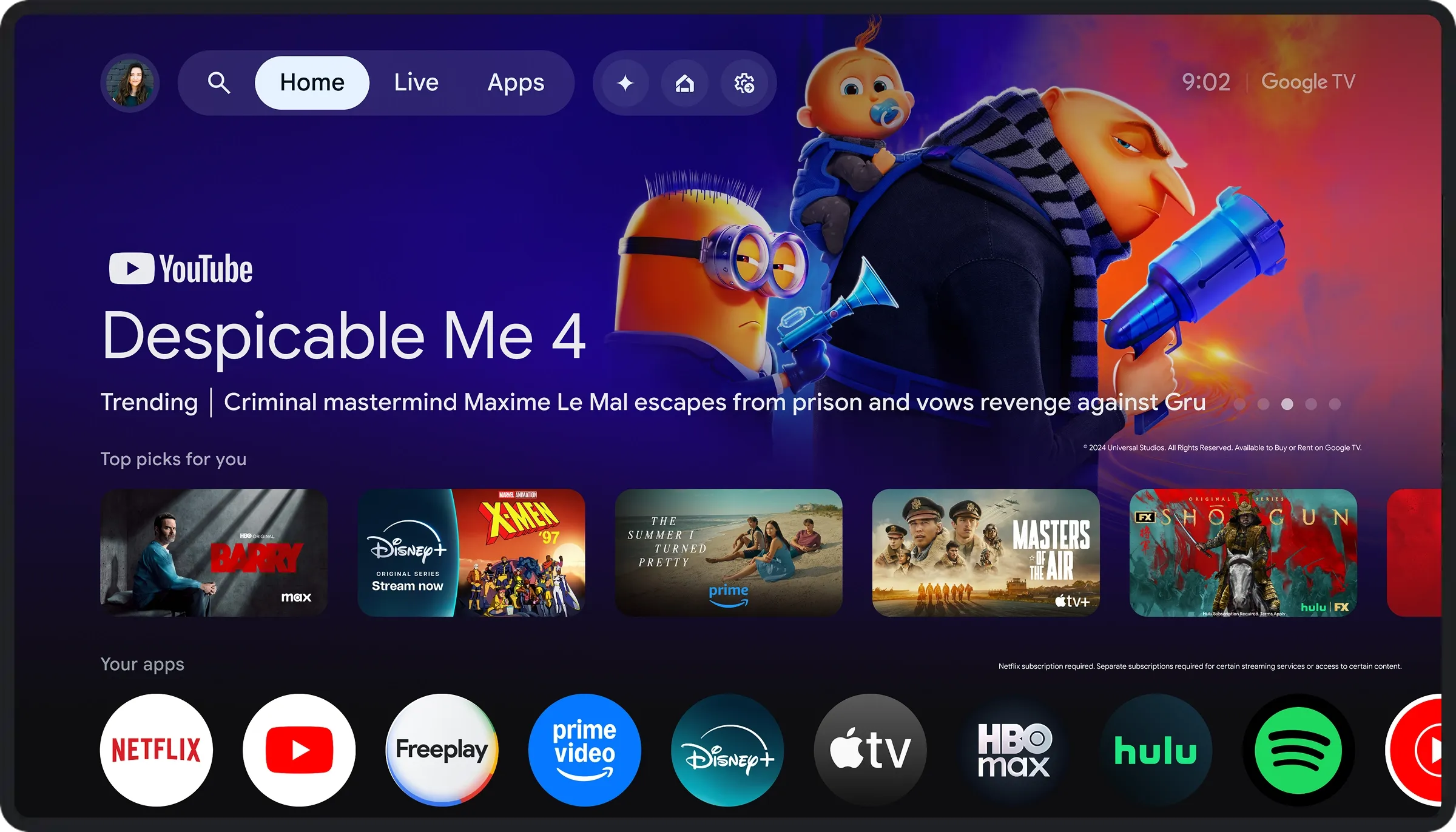 If you select the LIVE tab, or select the FREEPLAY icon (the third one shown on the screenshot) you will see a selection of local programming, similar to what you would see on your local cable or broadcast TV lineup. These programs are free to watch as they stream, there is no saving or recording available, and you will see ads interspersed between the show content.
YOUTUBE (NOT YOUTUBE TV): By far, the most popular streaming platform offers a selection of curated content for movies and TV shows, some available for purchase one-time, and thenn available in the "library" attached to the Google / Gmail account on your TV.
CONCLUSION: For casual TV watchers with a modest internet connection, there is free programming available for just about every niche. You do not need to pay out of pocket to enjoy regular programming, and the addition of streaming services would still be much less expensive then the comparably-priced cable TV offerings, even in 2026.